
At Brick Factory, we work extensively with nonprofits, helping organizations improve their websites, strengthen online fundraising, grow email capture, and address technical issues that quietly impact performance. We review a lot of nonprofit websites and see what works, what doesn’t, and where small changes can make a meaningful difference. Many organizations don’t need a full engagement. They just want a clear, quick read on how their site is performing.
So we built something.
We’ve launched a free, AI-powered Nonprofit Website Grader that provides structured feedback across key areas like design, usability, performance, donations, accessibility, and SEO. You can check out a sample report here.
It’s meant to deliver fast, practical insight, not a comprehensive audit. It reviews a limited set of pages, and like any AI system, it can occasionally miss things or get things wrong. But we believe it offers a useful way for nonprofits to get some quick insights on how well their website is performing.
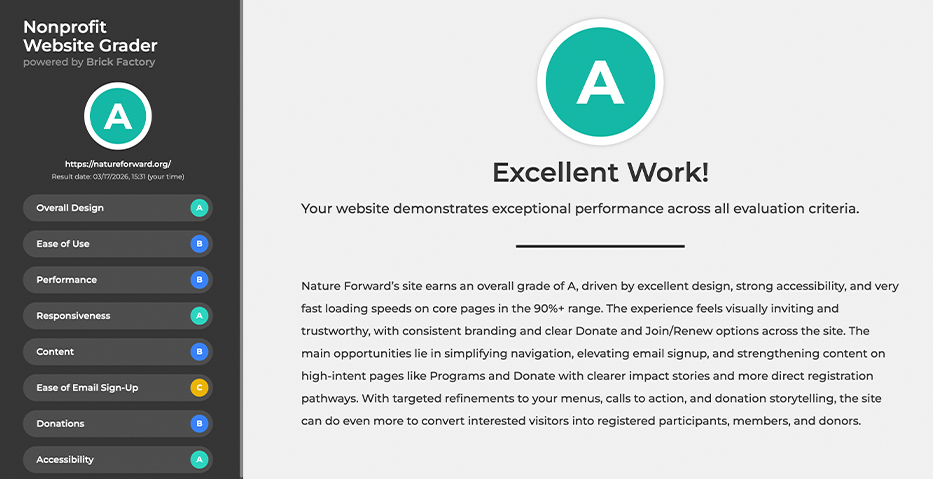
Below are details on how the grader works, what its limitations are, and why we built it.
Why did you build this?
Qualitative website feedback has traditionally required human review. We wanted to explore how well AI could replicate parts of that process by evaluating clarity, structure, friction, and alignment with organizational goals.
So far, we have found the results generally strong for a quick assessment. It will not replace deeper strategy work, but it can help organizations move faster toward improvement.
Who can use it? Is the nonprofit website grader free?
The grader is free and publicly available for nonprofits. If you manage a nonprofit website, give it a try. We’d welcome your feedback as we continue refining it.
And if you’re looking for a deeper conversation about improving your website, we’d be glad to talk.
How does the noprofit grader access performance, responsiveness, and accessibility?
The grader combines technical performance data with qualitative AI analysis.
For Performance, Responsiveness, and Accessibility, we use Google Lighthouse data.
For the remaining categories — including design, content, email sign-up, donations, and SEO — we use an architected crawling mechanism and OpenAI’s Models to evaluate the site against a detailed grading framework we developed. The model can be swapped if we decide to refine our approach.
Behind the scenes, we created a set of structured prompts that define what strong performance looks like in each category and guide the AI through a consistent evaluation process.
How does the website grader check SEO?
Our website grader evaluates SEO across three areas:
- Technical Performance. Using Google Lighthouse data, we assess page speed, mobile responsiveness, and core technical signals that influence search visibility.
- Content & Audience Alignment. Our custom crawler analyzes page structure, messaging clarity, and how effectively content aligns with a nonprofit’s intended audience.
- Topical Authority Signals. We evaluate how consistently your site demonstrates subject matter focus and structured information across key pages.
The grader does not conduct full keyword gap analysis or backlink profiling. Those require a comprehensive SEO audit. Instead, this tool provides directional insight.
Does it scan my entire website?
No.
For practical reasons, the grader analyzes five sample pages and uses those to inform the evaluation. That means it can overlook strengths or weaknesses that exist elsewhere on the site.
The nonprofit website grader is designed to provide directional insight, not a full-site audit.
Will it work on any website?
Not always.
Some websites cannot be properly accessed by automated agents.
The grader is designed specifically for nonprofit organizations. We try to limit access to sites that fall outside that category, but some may still run through the tool. If they do, the results may be inconsistent or not particularly useful. If the grader can’t retrieve page content, or if the site doesn’t align with nonprofit norms, it can’t generate a meaningful evaluation
Can the grader get things wrong?
Yes.
AI systems can produce hallucinations, which is feedback that sounds reasonable but is incorrect or illogical. However, feeding the AI with structured site data helps minimize the potential for hallucinations.
While we’ve structured the grading framework carefully, this tool should not be treated as definitive. It’s meant to surface ideas and opportunities, not serve as final judgment.
What Makes a Good Nonprofit Website?
A strong nonprofit website does more than look good; it drives meaningful action from the right audience. Based on more than fifteen years of experience building and optimizing nonprofit websites, we consistently see high-performing sites share these characteristics:
- Clear and compelling mission messaging
- Frictionless donation and email capture flows
- Strong calls to action aligned with audience intent
- Mobile-friendly, accessible design
- Fast load speeds
- Structured, SEO-friendly content
Great nonprofit websites don’t confuse or overwhelm users. They create clarity, reduce friction, and make taking action intuitive.